Best Feedback Widgets Software for Next.js
Join 2,200+ companies using Produktly to create exceptional feedback widgets that collect valuable insights to improve your customer experience on Next.js.




Why Produktly Feedback Widgets is Perfect for Next.js
Enhance your Next.js apps with powerful onboarding. Produktly works perfectly with Next.js Server Components and client-side transitions.
Supercharge Your Next.js Experience
Capture customer feedback instantly with simple but effective feedback widgets. Improve your product by listening to your users.
Instant Feedback
- Get notified via Slack or Discord as soon as a user leaves feedback.
Contextual Information
- Automatically capture device, browser, and URL data with every response.
Integration Hub
- Connect to thousands of tools with our native Zapier integration.

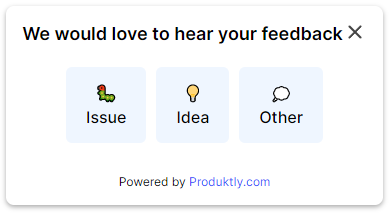
Simple Integration with Next.js
Getting started with Produktly feedback widgets on your Next.js project is quick and easy.
How to integrate:
- 1
Copy your Produktly script from the dashboard.
- 2
Add the script to your _document.js or use the Next.js Script component.
- 3
Use our visual editor to build tours on your local dev environment or staging.
- 4
Publish your tours and see engagement grow.


Next.js and in-app guidance
Next.js mixes server-rendered pages, client components, and the App Router’s streaming model. That means any in-app guidance script has two questions to answer: where to load it without blocking the initial paint, and how to handle navigation between routes that may be partially server-rendered.
The App Router does soft client-side navigation between segments. A tour that fires on initial mount needs to re-evaluate on route segments too, otherwise users miss steps when they move from /pricing to /dashboard.
Installing Produktly on Next.js
Use the next/script component in your root layout so the snippet loads once and survives client-side navigation.
// app/layout.tsx
import Script from 'next/script';

export default function RootLayout({ children }) {
  return (
    <html>
      <body>
        {children}
        <Script id="produktly" strategy="afterInteractive">
          {`
            (function (w, d, f) {
              var a = d.getElementsByTagName("head")[0];
              var s = d.createElement("script");
              s.async = 1; s.src = f;
              s.setAttribute("id", "produktlyScript");
              s.dataset.clientToken = "YOUR_TOKEN";
              a.appendChild(s);
            })(window, document, "https://public.produktly.com/js/main.js");
          `}
        </Script>
      </body>
    </html>
  );
}
For the older pages directory, drop the same IIFE into pages/_document.js via next/script. Strategy "afterInteractive" keeps it off the critical path.
Things to watch out for on Next.js
Script loads in the wrong segment
If you mount the snippet in a route-specific layout, it unloads when the user navigates away. Put it in the root layout so it persists for the whole session.
App Router navigation skips full reloads
next/link does soft navigation between routes. Configure Produktly’s SPA redirect mode so tours that span multiple pages still chain steps together.
Hydration mismatch warnings if you inject early
Loading the snippet inline before hydration can mutate the DOM and trigger React warnings. Use next/script with afterInteractive strategy to defer until after hydration finishes.
Why teams on Next.js pick Produktly
Next.js teams pick Produktly because the script is a single line in root layout, no SDK to keep in sync with framework upgrades. SPA redirect mode handles App Router and Pages Router navigation, and the editor stays out of the way of Server Components since it operates at the browser DOM level.
Other Next.js Guides
Product Tours
Product Tours software for Next.js.
Announcements
Announcements software for Next.js.
Checklists
Checklists software for Next.js.
Smart Tips
Smart Tips software for Next.js.
Tool Tips
Tool Tips software for Next.js.
Roadmaps
Roadmaps software for Next.js.
NPS Widgets
NPS Widgets software for Next.js.
Micro Surveys
Micro Surveys software for Next.js.
Changelogs
Changelogs software for Next.js.
Similar Platforms for Feedback Widgets
React
Best feedback widgets software for your React app.
Vue.js
Best feedback widgets software for your Vue.js app.
Angular
Best feedback widgets software for your Angular app.
Svelte
Best feedback widgets software for your Svelte app.
Astro
Best feedback widgets software for your Astro app.
Nuxt
Best feedback widgets software for your Nuxt app.
Remix
Best feedback widgets software for your Remix app.
Gatsby
Best feedback widgets software for your Gatsby app.