Best Feedback Widgets Software for Angular
Join 2,200+ companies using Produktly to create exceptional feedback widgets that collect valuable insights to improve your customer experience on Angular.




Why Produktly Feedback Widgets is Perfect for Angular
Guided tours for Angular applications. Produktly supports complex Angular layouts and lifecycle events for perfect onboarding.
Supercharge Your Angular Experience
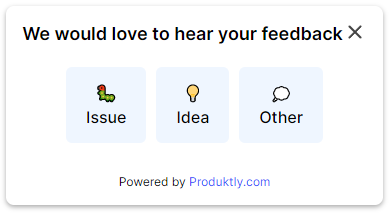
Capture customer feedback instantly with simple but effective feedback widgets. Improve your product by listening to your users.
Instant Feedback
- Get notified via Slack or Discord as soon as a user leaves feedback.
Contextual Information
- Automatically capture device, browser, and URL data with every response.
Integration Hub
- Connect to thousands of tools with our native Zapier integration.

Simple Integration with Angular
Getting started with Produktly feedback widgets on your Angular project is quick and easy.
How to integrate:
- 1
Sign up for Produktly and copy your script.
- 2
Include the script in your src/index.html file.
- 3
Launch the Produktly editor on your Angular app.
- 4
Build onboarding flows that adapt to your Angular components.


Angular and in-app guidance
Angular uses Zone.js to track changes and runs change detection across the entire component tree. View encapsulation scopes styles by default, which means class names you see in DevTools may have suffixes that your bundler controls. Targeting elements through framework-generated classes is fragile.
Angular apps are routed by the Angular Router, so navigation is in-app. Lifecycle hooks fire predictably, but external scripts that poll the DOM can race against ngOnInit. A tour script that runs before Angular finishes its first detection cycle will miss the elements it needs.
Installing Produktly on Angular
Drop the snippet into src/index.html before the closing </body>. Angular CLI keeps it intact through every build.
<!-- src/index.html -->
<body>
  <app-root></app-root>
  <script>
    (function (w, d, f) {
      var a = d.getElementsByTagName("head")[0];
      var s = d.createElement("script");
      s.async = 1; s.src = f;
      s.setAttribute("id", "produktlyScript");
      s.dataset.clientToken = "YOUR_TOKEN";
      a.appendChild(s);
    })(window, document, "https://public.produktly.com/js/main.js");
  </script>
</body>
If your app uses server-side rendering with Angular Universal, the script still belongs in index.html since it only runs in the browser.
Things to watch out for on Angular
View encapsulation adds suffixes to selectors
CSS classes get rewritten as ._ngcontent-c1.button. Use stable data-test or data-tour attributes that Angular leaves untouched.
Angular Router skips full page reloads
Enable Produktly’s SPA redirect mode so tours that move between feature modules follow router events instead of waiting for navigation that never happens.
Change detection can hide tour targets briefly
If a tour step targets an element guarded by an *ngIf with an async pipe, the element may not exist on first detection. Use takeUntil or skip the first tick before showing the step.
Why teams on Angular pick Produktly
Angular teams pick Produktly because the integration is a single HTML script, no @produktly/angular package to bump every major release. SPA-aware redirect handling fits cleanly with Angular Router, and the editor sidesteps view encapsulation by working with data-* attributes you already use for e2e tests.
Other Angular Guides
Product Tours
Product Tours software for Angular.
Announcements
Announcements software for Angular.
Checklists
Checklists software for Angular.
Smart Tips
Smart Tips software for Angular.
Tool Tips
Tool Tips software for Angular.
Roadmaps
Roadmaps software for Angular.
NPS Widgets
NPS Widgets software for Angular.
Micro Surveys
Micro Surveys software for Angular.
Changelogs
Changelogs software for Angular.
Similar Platforms for Feedback Widgets
React
Best feedback widgets software for your React app.
Next.js
Best feedback widgets software for your Next.js app.
Vue.js
Best feedback widgets software for your Vue.js app.
Svelte
Best feedback widgets software for your Svelte app.
Astro
Best feedback widgets software for your Astro app.
Nuxt
Best feedback widgets software for your Nuxt app.
Remix
Best feedback widgets software for your Remix app.
Gatsby
Best feedback widgets software for your Gatsby app.