Feedback Widgets for UX Designers
UX Designers and UX Researchers craft the user experience from research through interaction design and usability testing. They use digital adoption tools to bridge the gap between intended design flows and actual user behavior, collect in-context feedback, and progressively disclose complexity so interfaces stay clean while advanced features remain discoverable.
Challenges UX Designers Face
Users bypass carefully designed flows and miss critical UI elements, leading to confusion and support tickets
Usability feedback is collected in out-of-context surveys or interviews days after the interaction, reducing signal quality
Complex features require explanation that clutters the interface if embedded permanently in the UI
No lightweight way to A/B test guidance patterns without engineering support and full release cycles
Goals Produktly Helps Achieve
Guide users through intended flows without compromising clean interface design
Collect contextual usability feedback at the exact moment of interaction
Progressively disclose advanced functionality so the UI scales from novice to power user
Validate design hypotheses quickly through targeted in-app research methods
How Feedback Widgets Empowers UX Designers
Preserve clean UI while providing guidance
- Use tooltips and smart tips to deliver contextual help that appears only when needed, keeping the core interface uncluttered while ensuring discoverability.
Run in-context usability research
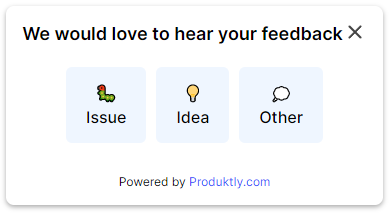
- Deploy micro-surveys at specific interaction points to capture task-level feedback with high recall, replacing delayed post-session surveys.
Progressive disclosure through interactive tours
- Layer product tours that introduce advanced features only after users have mastered the basics, matching the learning curve you designed for.
Prototype guidance without code changes
- Use the visual builder to quickly create and iterate on onboarding flows, testing different guidance patterns before committing them to the product design system.
Quantify flow completion and drop-off
- Analyze step-by-step tour analytics to understand exactly where users struggle in a flow, providing concrete data to support design recommendations.

A Day with Produktly as a UX Designer
A UX Designer reviews tour drop-off analytics to see that 40% of users abandon a multi-step setup wizard at step three. They redesign the step, update the tour in the visual builder, and push it live before lunch. In the afternoon they place a micro-survey on a newly redesigned settings page to collect satisfaction data over the next week, creating a tight build-measure-learn loop that does not require a developer or a full sprint cycle.
Frequently Asked Questions
How do product tours fit into a design system without creating a disjointed experience?
Produktly lets you customize every aspect of tour appearance through themes, including colors, typography, border radius, shadows, and button styles. You can match your design system precisely so tours feel like a native part of the product rather than a third-party overlay.
Can UX Researchers use Produktly to run in-app usability studies?
Yes. Micro-surveys and feedback widgets can be triggered at specific interaction points, targeted to particular user segments, and configured with open-ended or structured questions. This lets researchers collect task-level feedback at scale without scheduling moderated sessions for every question.
Does Produktly support testing different onboarding approaches?
You can create multiple tour or checklist variants and target them to different user segments to compare completion rates and downstream engagement. This gives designers a lightweight way to test guidance strategies before investing in permanent UI changes.
Start Using Feedback Widgets Today
Join thousands of ux designers who use Produktly to drive better outcomes.
Start free trialOther Features for UX Designers
Product Tours
Product Tours for UX Designers
Announcements
Announcements for UX Designers
Checklists
Checklists for UX Designers
Smart Tips
Smart Tips for UX Designers
Tool Tips
Tool Tips for UX Designers
Roadmaps
Roadmaps for UX Designers
NPS Widgets
NPS Widgets for UX Designers
Micro Surveys
Micro Surveys for UX Designers
Changelogs
Changelogs for UX Designers
Feedback Widgets for Other Roles
Product Managers
Feedback Widgets for Product Managers
Customer Success Managers
Feedback Widgets for Customer Success Managers
Growth Managers
Feedback Widgets for Growth Managers
Customer Support Teams
Feedback Widgets for Customer Support Teams
Engineering Teams
Feedback Widgets for Engineering Teams
Founders & CEOs
Feedback Widgets for Founders & CEOs
Sales Teams
Feedback Widgets for Sales Teams
Onboarding Specialists
Feedback Widgets for Onboarding Specialists